

Must Read
You are here: Home / Off Topic / How Tos and Guides / How to Root and Unroot Samsung Galaxy Y (Young GT-S5360)

How to Root and Unroot Samsung Galaxy Y (Young GT-S5360)

How to Root Samsung Galaxy Y (GT-S5360) and Unroot it

This guide will show you a step by step procedure on how to Root Samsung Galaxy Y S5360 (or Galaxy Young) and how to Unroot it. But before I proceed, let me just give you a little background on what is root or what is rooting an android phone means and why people root their android phones.
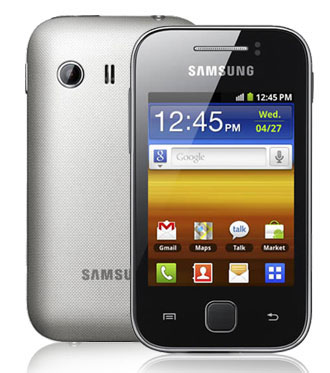
how to root samsung galaxy y young s5360

Basically we Root our Android phones so that we could have access to all files and system even to the Operating System level itself. Through Rooting we could further customize and modify an Android phone. There are tons Apps or applications out there which requires that your Android phone must be rooted first before you can use them.

Through rooting you can customize the looks of your Android phone, or in this case your Samsung Galaxy Y S5360. You can change themes, do Full backup of your system, run special apps and many many more.

Before you proceed, let me just remind you that ROOTING WILL VOID WARRANTY. So proceed with caution and do it on your own risk!

UPDATE: If you can’t download the update.zip or unroot.zip, here is a new and easier way to root and unroot your Samsung Galaxy Y. The tool is called Multi Root Installer V1.0 created by manoranjan2050 an XDA Forum member.
Feature Of Multi Root Installer:

  • Added SuperUser 3.1.3+Su
  • Added SuperSU 0.94+Su
  • Added BusyBox binary v1.20.2
  • Added SQlite3
  • Added SSh

UnRoot Support:

  • Deleting all traces of Superuser And SuperSU
  • Deleting all traces of Suhax
  • Deleting all traces of Busybox and Busyboxpro

Supported/Tested Device:

  • Galaxy Y (GT-S5360)
  • Galaxy Y Duos (GT-S6102)
  • Galaxy ACE Duos (GT-S6802)

How to Use: Download Multi Root Installer here and copy the downloaded file to the root of your SD card and flash it via CWM (ClockWorkMod Recovery).

For more information about this tool visit original thread here.

Alternatively you can also root/unroot your Galaxy Y using the methods below.

How to root your Samsung Galaxy Y? Below is a step by step procedure:

1. You need to download the file update.zip here
2. Connect your Samsung Galaxy Y to your computer
3. Copy the update.zip to the root of your SD card
Note: If you are accessing this page and downloading the file through your Android phone, then skip step number 2.
4. After you have copied the file update.zip to the root of your SD card, turn off the Galaxy Young.
5. Then turn it ON again, BUT this time go to recovery Mode. Press power, volume up and home button together.
6. Your Galaxy Young will boot into a BIOS like display, choose “apply update from sdcard”. Use volume up and down to scroll, and home screen as enter.
7. Browse through the files and choose update.zip and hit the home button to begin the rooting.
8. Wait until your Samsung Galaxy Y finishes updating.
9. And your done! Your Samsung Galaxy Y S5360 should now be rooted.

How to know if your Galaxy Young S5360 is already Rooted? You should be able to see the Superuser icon in your Galaxy Y.
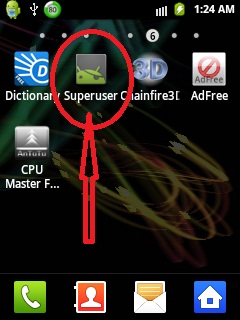
root samsung galaxy y gt-s5360

Just in case you decided to Unroot your Samsung Galaxy Y (perhaps for warranty purposes), below are the steps on how to Unroot Samsung Galaxy Y S5360:

1. Download the update-unroot.zip here
2. Do the same steps above (like your rooting your phone), except that you should use update-unroot.zip.
3. That’s it! your done! Your Samsung Galaxy Y S5360 should now be unrooted.

Remember Root and Unroot your Galaxy Young at your own risk! Good luck!

See also: Best Android Battery App

UPDATE: Alternative links to root.zip and unroot.zip can be found here

I suggest you also check out How to Increase internal phone memory of Samsung Galaxy Y S5360 and How to Move Apps from phone memory to SD Card for Android smartphones.

Click here to subscribe to The PC Enthusiast and Anime Fanatic and receive latest news on technology, including great deals and discounts!
Related search terms:
  • how to root samsung galaxy y
  • how to unroot samsung galaxy y
  • how to root galaxy y

93 comments

  1. amigo no me deja me sale obortado o failet

  2. I get aborted

  3. unroot doesn’t “unroot”. it is still rooted.

  4. the file is in Symbianize site and i cant enter it, it is very difficult to register in it please heeeeeeeelp

    • Please refer to the update section at the end of the article.

      • Hi, worked brilliantly for me,
        “root234.zip” has worked on my galaxy mini GT-5570 running gingerbread 2.3.4 (O2 locked)
        and also on my wife’s galaxy “y” GT-5363 running gingerbread 2.3.6 (O2 locked)
        I used this in conjunction with “Link2sd” from google play store.
        We both have 16GB sd cards installed, i partitioned mine to1.8GB unallocated, and my wife’s to 1.99GB unallocated.
        All partitions had to be primary
        The larger partitions were set to “Fat32″
        on my 5570 the unallocated partition was set to Ext2
        on my wife’s 5363 it was set to Ext3
        I used “mini tool partition wizzard” to format both cards
        Thanks to all the posts made by different people that enabled me to eventually root both phones

  5. not mounting my sd card while in recovery mode

  6. did not you find some other place to host the file?????

    • I manage to find an alternative. But I have not tried these files. Please refer to the update section at the end of the article.

  7. Can u plz tell me what is chainfire3d?

  8. where is the root file to download

  9. When I try to root my
    Samsung Galaxy Y, by
    using “update from SD
    card” option present in
    Recovery Mode, an error
    appears stating that
    “Can’t mount SD card”. I
    have tried using a
    different SD too but still
    no solution. How can I get
    my phone rooted ??

  10. I’m stuck her “press power, volume up and home button together.” i can’t get the BIOS like to appear.how?

  11. i accidentally copied file to the fls folder and can’t get it deleted. can anybody help me on this one?

  12. I’m not sure if I’ll do this. But my phone internal memory was too low. I can’t install many apps and I always delete caches and history but still it was about 50% free. I have only few apps about 20mb. I want to try this but I saw negative comments that is doubting me. I’m familiar with that Symbian word and It has negative impact on me because my old cellphone has a virus named Symbian.

  13. How come you answer their question with answers too?

  14. is there any harmful effect of rooting galaxy y ? if than how to prevent from those effects ? can we paly hd games by rooting our phone ?

    • Rooting your phone could:
      It could brick your phone (meaning making it unusable if not done properly). Soft brick can be fixed easily. Hard brick is the worst things that could happen.
      Rooting your phone voids warranty.
      When your phone is rooted you should make sure that you have the right protection since malware and other virus can have access to the root system, if left unprotected.
      But there are many things you can do with your phone when rooted. Unfortunately Galaxy Y is an entry level phone and it very limited and can not play HD games.

  15. I can’t download unroot.zip :/

  16. sir y is this update.zip file not downloading ,, its showing page cant displayed I hav treid ten times ,, could u send me another link for this plz !!!!!!!!

  17. hi.. i want to root my phone. samsung galaxy y s5360. can you recommend a trusted malware protector?

  18. Check your links the link to the Multi Root Installer is broken.

  19. Hi, I want to increase the phone memory of my Samsung Galaxy Y S5369, so can I use the procedure cited to root then partition the SD card for the Samsung Galaxy Y S5360?

    Phil.

  20. Hi Jeff. i have galxy tab p1010 running on gingerbread 2.3.6. do you have a rooting update.zip file for this? if u have can you please email me the link. i wanted to root this tablet. please help.
    thanks in advance
    Renik

  21. hi Jeff, i have a samsung galaxy y…. I installed Chainfire3d…. The problem is I cant seem to reset to default the settings…. I removed the Chainfire but the graphics of my opera mini app is still busted. I re-installed opera mini nothing has changed…. plese help me..

  22. I’m Nithin K, ill be very thankful if I can get information how to root my Galaxy POP(GT – S5570), I’ve nil knowledge of rooting.. thanks in advance :)

  23. Hi,

    I have tried all the steps i am getting this error Link2Sd could not obtain root access, if you have root access make sure you respond “Allow” or “Grant” to the supervisor request).

    Please help me

    Regards,

    HKP

  24. Hello friends,
    Any one can help? I did all the steps but the file i downloade is not called update.zip it’s (Multi Root Installer) so I chose this file through booting after the booting I didn’t see the Icon of SuperUser in my menu .. any one had sane problem?? please help me .. I need external space in my phone ..
    Regards

  25. Hi Jeff,
    After we select update from sd card , its saying aborted and then need to reebot the phone

    Regards,

    HKP

  26. Is it still working?

  27. thanks great guide. I am an user of samsung galaxy y with android 2.3.6 ginger bread os mobile phone. does my mobile can upgrade to 4.0 ice cream sandwitch??

    • Unfortunately samsung did not release an official ICS update for Galaxy Y. But there are custom ROMS that will make your Galaxy Y look like you are running on ICS or Jelly Bean

  28. Thanks jeff, I will find out :)

  29. i want to increase internal memory on my samsung galaxy y gt s5360.i followed your advice but i can’t success.pls help me.

    • Did you try link2sd? Link2sd does not physically increase the internal memory. What is does is it makes a portion of your sdcard an extension of your internal memory. it’s not a total and complete solution but it works.

  30. I am wish to know that, can i root my GALAXY Y CDMA i509 handset ? How can i backup my datas in my handset ?

  31. how to go to the root of your sd card ?

  32. does unrooting galaxy y format sd card

  33. why does leaving my wifi on for some time changes the way i have customized my apps? it doesnt happen before i rooted my phone.

    • Perhaps you have an app installed that alters the settings of your phone. Rooting your phone is not really safe as you (and apps) get root access. Try installing some anti virus or anti malware or similar software.

      • i had avast antivirus and avg as well.
        i already encountered 3 problems so far..
        first is that ^. the apps and customization are missing until i restart the phone again,
        second, it mow automatically turns off after i leave it some time.
        and just now, the date and time were reset to january 7, 2011

        any solutions with these issues? it will be a lot of help. THANK YOU?

        • Hi Haylyn, I haven’t encountered this problem yet. I suggest you do a factory reset and wipe cache. Of course, this will delete everything.

  34. Hi Jeff,
    my samsung Y always shows “Low internal memory” error. i have used link2sd but some apps i am not able to move to SD.
    Do i have to do rooting and SD partitioning then i can move all apps to SD and make internal memory space. Plz guide me?

    • Hi Sam
      You need to root your phone before doing the Link2SD. and basically this method does not “literally” move your apps to your SD card. It links a partition of your microSD to your phone’s internal memory to make the internal memory look bigger. It’s not a perfect solution but works (although not 100%) Sometimes it fails.
      And it’s also advisable to clear your phone first of the apps. After you have done the link2sd. Install those apps again.

  35. I rooted my Galaxy Y.
    Then i did factory data reset.
    Now in recovery mode it shows cant mount sd card.
    but my sd card is working properly.
    i formatted again in pc but it dint work.

  36. guys i root my phone using moborobo you still need the file it is easier

  37. the unroot link is not working :(

  38. thnxxx a lot !! it worked !!

  39. the webpage for update.zip is not available .. what to do ?

    • I’ll update the links sorry about that.
      UPDATE: Links seems to be working. Please use the alternate link I provided below at the end portion of the article.

  40. rooting works!!!!! awesome….but plz help…can give me the link of chainfire 3d…and wat site should i download it…thanks…
    here’s my fb accnt. “riguerosalcris@yahoo.com

  41. everytime when i am rooting my phone it is showing error of”mount sd card “please help please

Leave a Reply

Your email address will not be published. Required fields are marked *

*

You may use these HTML tags and attributes: <a href="" title=""> <abbr title=""> <acronym title=""> <b> <blockquote cite=""> <cite> <code> <del datetime=""> <em> <i> <q cite=""> <strike> <strong>

Scroll To Top