

Must Read
Home / Off Topic / How Tos and Guides / How to Increase internal phone memory of Samsung Galaxy Y S5360

How to Increase internal phone memory of Samsung Galaxy Y S5360


Samsung Galaxy Y Young S5360 is one of the popular entry level android smartphone today. But because it is relatively cheap, it does have its limitation. One is its internal phone memory storage. Samsung Galaxy Y has only 160MB of internal storage. Here’s the good news, now you can actually increase that to make room for more apps and games. How? I’ll show you.

Here’s the thing, we are not actually gonna replace any parts of your Galaxy Y or unlock something to increase it’s internal memory. We’re going to make use of the external SD card. Below are the steps on how to increase the internal phone memory of Samsung Galaxy Y S5360.

Note: This procedure is not limited to Samsung Galaxy Y alone and it can also be done in other android smartphones. And proceed with CAUTION. If you’re not careful you will experience data loss in your Samsung Galaxy Y/android smartphone.
Try this procedure at your own risk. I will not be held responsible if you messed up and something happens to your phone

How to increase internal phone memory of Samsung Galaxy Y (or any android smartphones):

1. You will need to root your Samsung Galaxy Y. If your phone is still not rooted read this: How to Root and Unroot Samsung Galaxy Y (Young GT-S5360)

Must Read Article -> The Android Rooting Guide: Things You Need to Know

2. We need to create a partition on your SD Card or your microSD card.

2.a. To create a partition in our microSD Card, we will be needing a free tool called MiniTool. You can download one here.

2.b. After you have download the MiniTool Partition Wizard, install it in your computer and Run MiniTool.

2.c. If your microSD card is new then you can proceed with creating a partition. If not, be sure to back up everything in your microSD card. Creating a partition will delete every data in your microSD card. Proceed with caution. The first time I did this, almost all of my apps and games where gone, but they were still physically installed.

2.d. Plug your microSD card to your computer. While in MiniTool, right click your microSD card drive and format it. REMEMBER: Be sure it is the correct drive and do this after you have backup every data in your card. Select fat32 as file system, hit ok and hit the apply button found in the upper left corner of MiniTool (the one with the big blue check mark).
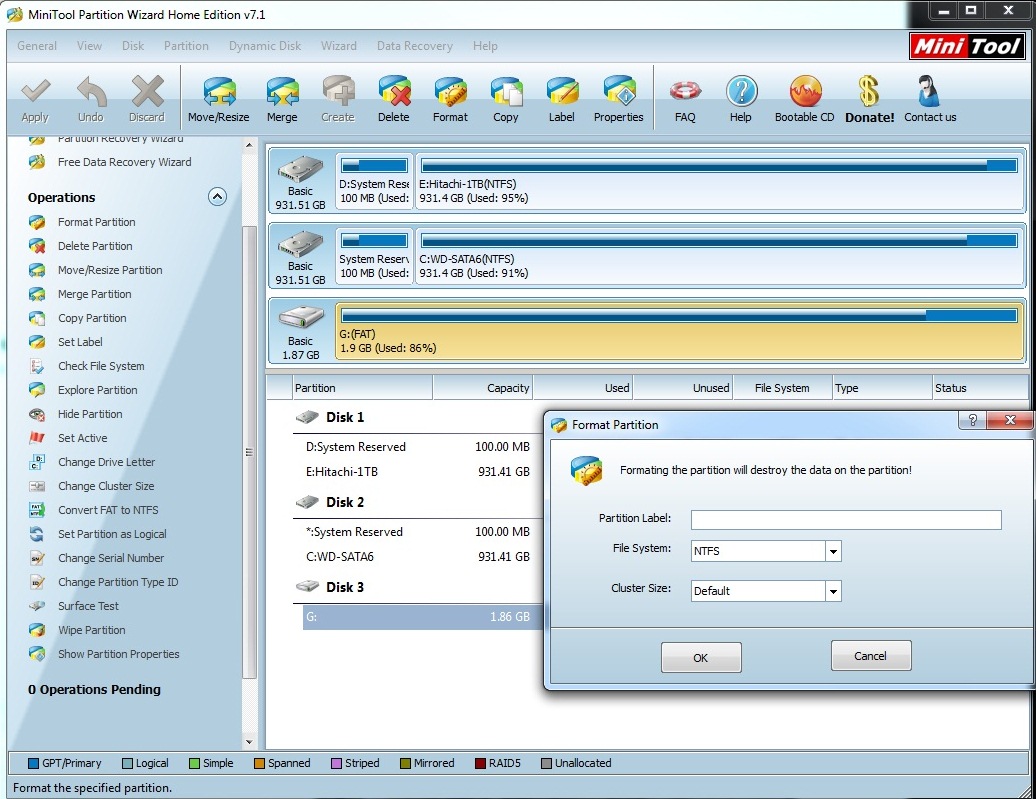
how to increase samsung galaxy y internal memory

2.e. After you have formatted it, right click on the microSD drive again and select Move/Resize. In my case I created a 1.37GB partition size while the unallocated space is set to 500MB. The unallocated size will serve as the additional internal memory of your android smartphone. Hit ok after you have set the partition size.

2.f. You will see in the MiniTool window an unallocated size in your microSD card. In my case, its about 506MB. Right click and create a partition for it, it will be formatted at the same time. Choose EXT3 as its file system. Hit the Apply button again after. Again be sure to hit the big check “Apply” button otherwise the changes would not be implemented.
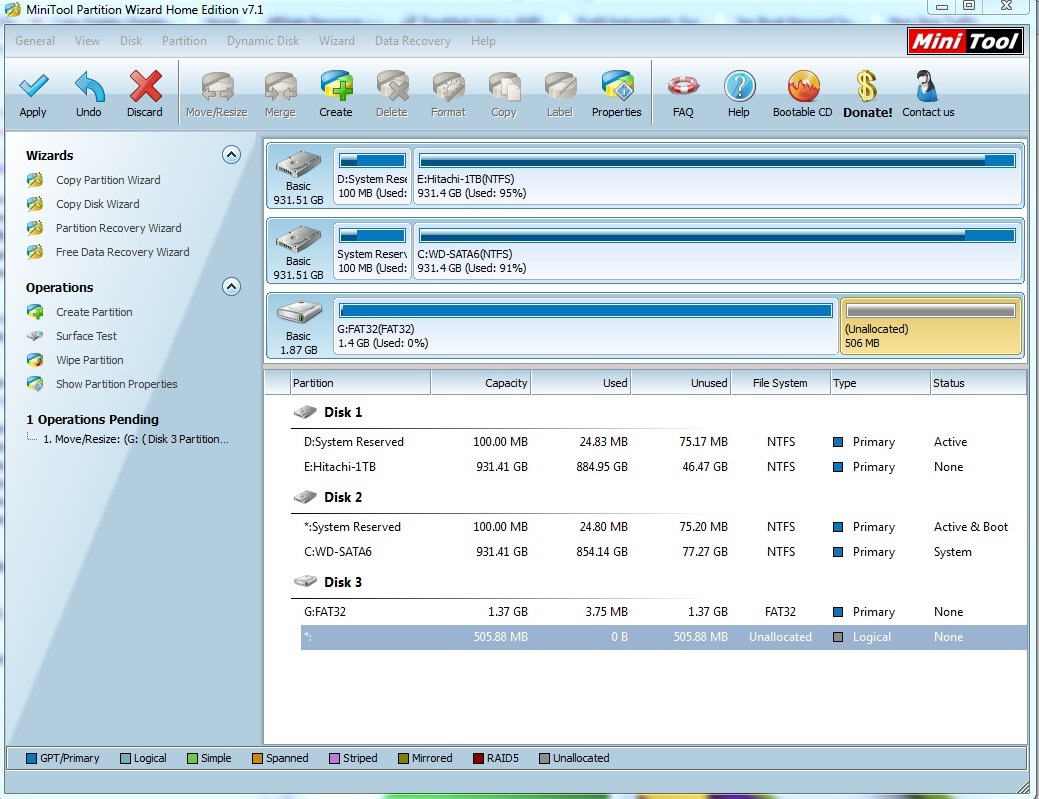
how to increase android smartphone internal storage capacity

3. After partition, you will only see the FAT32 portion of the microSD in your Windows Computer. But in Minitool you will see that there is a FAT32 and EXT3 partition. Now your done with the partitioning.

4. After you have created the two partitions (fat 32 and ext3), remove it and plug your microSD to your Samsung Galaxy Y (or android smartphone)

5. You will also be needing another app called link2sd. You can download link2sd here.

6. Install link2sd in your smartphone, run link2sd and it will ask you to mount script. Choose ext3 and hit OK.

7. After you have successfully done that, reboot your android smartphone.

8. Once your phone returns from reboot, Run link2sd, go to its settings and check everything to auto-link. That should do it!

You’re done! By now you have increase the Samsung Galaxy Y’s internal memory. Another option is to transfer the installed apps to your SD card. You can read my article How to Move Apps from phone memory to SD Card for Android smartphones

If you want to read more about link2sd and how it works, you may go here.

[alert type="blue"]Check out one of the popular and fastest MicroSD Card currently on the market here[/alert]

See also: Top 10 Best Battery Saver App for Android

UPDATE:

I tried this process again this time using a 8GB microSD. Below are my notes and observations:

Always hit the Apply button on MiniTool so that changes to your microSD card like formatting and partitioning would be implemented.

If the EXT3 does not work, try using EXT2. It also worked for me.

If you encountered an error something like SD Card 2nd Part “not found” or mount: invalid arguement or /dev/block/mmcblk0p2: device not found Make sure you have two partitions on your SD card and both are primary. use EXT2 instead or EXT3. Make sure you download the official Link2SD from Google Play. Go to options in Link2SD and choose “More” and choose “Recreate mount scripts”. If it doesn’t work try to remove the microSD card from the Galaxy Y and restart your phone and run Link2SD again.

If it does not work, try to do the whole processes again, try EXT2 instead of EXT3. Make sure both partitions are set to PRIMARY.

If you have successfully completed the process, the physical internal memory size of your Galaxy Y WILL NOT INCREASE. Instead after the internal phone memory is used up, it will automatically link the internal phone memory to the created partition. I tried to download as many games as possible, and as you can see in the screenshot below it automatically “linked” to the partitioned microSD.
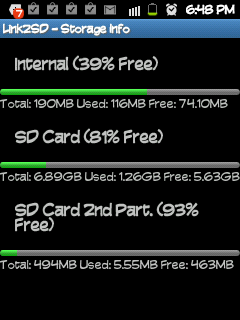
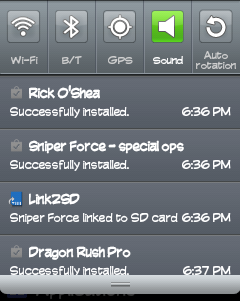
NOTE: Again do this procedure at your own risk! If you are not sure about what you are going to do or what you are doing, then don’t try this at all.

Click here to subscribe to The PC Enthusiast and Anime Fanatic and receive latest news on technology, including great deals and discounts!
Related search terms:
  • how to increase internal memory of samsung galaxy y
  • internal phone storage is getting low samsung galaxy y
  • how to increase internal memory of galaxy y

342 comments

  1. hello, it’s good topic thx but i have problem,

    all steps went good but when i open link2sd and choose EXT3 and press ok it’s gives error saying :-

    mount script cannot be created.
    mount: Invalid argument

    and i did all the steps as u said, any suggestions ?

    • Hmm, I haven’t encountered it. I guess you should try to uninstall the link2sd and install it again. Or partition the EXT3 again. BTW, how big is the EXT3 partition? Perhaps it has a limit, that is why its returning an error.

      • Same problem here , it shows mount script cannot be created
        mount: device or resource busy

        • with me ext2 resolve the problem

          • i have done everything and follow all intrucstion to make partition in mini tool and i did all ok i see my partition but when i open link2sd nothing happen, its say that root not gain…….. but if i make option i see my partition is there in the phone but it never make any changes. i try ext2 and ext3 many time i already start all over and over and not working…….

      • i have done every thing as prescribed n everythng is done fine.. but i cannot see the partition in phone… i increased memory upto 600MB but i dont see that partition.. only phne memory i.e 190MB n SD card as 3.09 GB … i used 4GB card … rooMB i not shown as in ur case …. i installed an app it said link2sd is linking that app…..

      • i used $GB card… allocated 600 MB for increase in phne memory but i cannt see the 600MB partition in phne as in ur case… i installed an app n it notified me that internal memory is full n another notification that link2sd is linkin that app. … wat next now????

    • I have the same problem here… help please?

    • That means you have NOT rooted your device properly. Try to re-root it.
      copy the file downloaded to the root of your SD card (i.e. simply open your SD card and just paste it.)
      Now switch off your phone.
      Then press power, volume up, and home keys together.
      the phone restarts in download mode. use volume and power keys to navigate, home key to select.
      select “install from sdcard” and then select “update.zip” file. reboot the system after the process is complete. then run link2sd again.
      It’ll work.

  2. ah i got the solution , u forgot to tell when we create the partition of the allocated space u should make it primary also .

    fix it in the topic !

  3. I have big problem! I followed the steps properly (I swear! XD). When I opened Link2SD, it didn’t ask me anything. I had to use “Recreate mount scripts” in the options only to get this error:

    /dev/block/mmcblk0p2: device not found
    Make sure you have two partitions on your SD card and both are primary.

    So I went to “Storage Info” and found out that “SD Card 2nd Part” was “Not Found” despite that the 500MB space I formatted as ext3 and set as primary was doing fine on MiniTool…

    Pls help :(

  4. why is this does the software lookdifferent to the images, why it only says “wipe partition” and “wipe disk” my memory card does not work anymore and I wiped the disk.

    Any help please!! I am using Windows 7

    Thanks

    • You might have skip a step or forgot something.
      Please reformat you microSD.
      Insert your microSD to your SGY
      Go toSettings->SD card and phone storage
      Choose Format SD card.
      That should do it.

      Hope this helps! ^_^

      • Dear Jeff,

        Thanks for wonderful work. I have done it successfully. I have one suggestion your link for minitool takes to MiniTool Dirve Wipe and most of people download the first freeware which not one we are looking for so will rewrite “MiniTool Partition Wizard” instead of just MiniTool. I feel that it will help them better.

    • hey … even i did de same wrong thing by downloading minitool drive wipe…
      just download n install minitool partition wizard home edition (around 10mb)
      which is available in de same webpage…
      hope u will get it…

    • memory card will surely work..just plug in then,
      only u need to go mycomputer-rightclick-manage-disk maagement
      then u will see de SD card… again right click on that n click to
      “change drive letter n path ” and give any letter… better give it as G..
      hope it will help..
      aady_m@yahoo.com

  5. how can i retrieve my deleted images from internal phone memory on samsung galaxy y…??

  6. Even after all process it gave success . But in applications in device memory no increment

  7. dude………….just awesome man!!!!!

  8. after selecting ext3 in link 2 sd i get message that
    Mount Script cannot be created.
    mount: invalid arguement

  9. i changed to primary and done everything, everything went ok. but my internal memory didn’t increased. my phone still shows that internal memory is full.

    • Perhaps you missed something

      • jef i have now big problem, i did all step by step but when i create the 2nd unallocated partition supposedly for my extra internal memory a dialog box appear says that ….. blah blah… and i did not read it and understand it… my sd card now not readable.. and i cant even format it or even minitool cant read or detect my sd card.. what should i do?? i think this will be fix in non-windows OS.. but the problem is i have no source of non-windows.. anybody can help me?

        help me please this is my email address
        —-my sd card is 16GB
        jayaclan_mine@yahoo.com

  10. after doing this procedure i got the extra internal partition memory. but my 2gb sd card decreased to 876mb…now the total memory of my sd card is 876mb.
    what shall i do? plz help to make my sd card back.

    • Your SD card’s memory will surely decrease because you have successfully shared it with your internal memory. If you want to revert your SD card’s memory back to its original size, you have to unlink it from your galaxy y and remove the partition and reformat it back to fat32.
      Be sure to backup your data before doing this. good luck!

  11. I followed all the steps, but after I mount it in my SGY its says “Damaged SD Card” :( (

  12. I did all the steps, but when i checked on Link2SD

    SD Card 2nd Part
    “not found”

    Please help!

    rdiones0911@gmail.com

  13. after doing the partition and stuff could i unroot my phone again? or not?

    thanks for this post. worked ! :)

  14. how can i unlink it from galaxy y and how can i remove partition..
    plz explain it step by step..

    • Hi bro! did you not notice any unlink option in the App? If not DO BACK UP all your files and app first for both internal and external storage. And just try to reformat your microSD using the software above. Be very careful when doing this, this WILL cause data loss if not done properly. You’re phone’s internal memory and microSD are link to expand storage capacity, just like in RAID mode in computers.

    • Hi bro! did you not notice any unlink option in the App? If not DO BACK UP all your files and app first for both internal and external storage. And just try to reformat your microSD using the software above. Be very careful when doing this, this WILL cause data loss if not done properly. You’re phone’s internal memory and microSD are link to expand storage capacity, just like in RAID mode in computers.

  15. after selecting ext3 in link 2 sd i get message that
    Mount Script cannot be created.
    mount: invalid arguement

    what i do. plz help me …
    singh.jai97@gmail.com
    fat32 primery
    and partaion logical

  16. How would you know if your internal memory really increased?

  17. Can we do partition from 8 GB card ?

  18. Thanks a lot my Dear… I am going to try this, dont know whether it will really help me out or not? But after reading your idea, I am relaxed a little.
    Thank once more, I will try n let U know.

  19. Thanks my Dear a lot. Dont know whether it will help me or not but still believes in U. Please guide me if I require any of help for increase the internal memory of my Samsung Galaxy Duos phone.

  20. Thanks a lot for all Ur Ideas. Guide me if I come for any problem of increasing internal memory of my Samsung Galaxy Duos.

  21. works fine
    tested with a 32GB SD card
    directly connected to phone via usb (connected mode)

    minitools for partitioning usb drive (always recognize again & again the disk by un/replugging)
    you can repart and reformat via the phone on trouble
    first partition 28 gb fat 32 primary formated active
    second part 1.2 gb fat32 primary than changed to native linux 83 formated ext3

    link2sd
    reboot galaxy

    take care with 32gb , laptops often read sd (4gb) not sd hc

    french tester
    wal

  22. Myproxyemailaddress

    When I click the “Apply” button on MiniTool, I get this error:

    Failed to execute the following command:

    ResizePartition DiskIndex:1 PartitionIndex:1 NewStartingLba:63
    NewPartitionSize:13301757 SafeMode:1

    Error Code: 16
    Disk I/O error.

    Please help me, Thanks in advance!

  23. IT WORKED fOR ME KEEEp it UPPPP

  24. how come i cant open the mini tool download..it says file corrupted >.<

  25. after select the file system show mount script is created please restart but after restart again show select the file system & in storage info. show SD card 2nd part not mounted ……plz plz help me
    mohitmohata20@gmail.com

  26. Hey, how to get back tht memory to sd card,, plzzz tell ..
    my mail:-

    sonimargav@yahoo.in

    • Hi Margav,

      You can reformat your SD card using the minitool. Just reformat and remove the partition to get your microSD card back to its original state. However I would like to remind you that if you have successfully linked your internal memory and microSD card, removing or reformatting the card could erase/corrupt/remove the apps that you have installed that was linked to your SD card.
      Again do back up your data or your phone before doing any changes.

  27. tanx men… it works! by the way, you reaky need to make the ext3 a primary.. if u dont it will not work even you use ext2..

  28. Symonz_arrianne

    hell shit . it doest work . /dev/block/mmcblk0p2: device not found
    i have try this many times . 5 hours left but still not done . please help me or let me see a video .
    huhuhuhu ! :( (

  29. thnks for the wonderful trick.. but i would like to ask something.. I have linked the internal memory with the ext2 partition successfully, the new apps will be linked to it after installation.. but i have only 20 MB free in internal memory.. is there any way to free the internal memory which is already consumed by previous apps and system.. please advise.

    thanks,
    Pravin Parmar
    sunnysgreat2008@gmail.com

  30. can i use another memory card. after i did this with the other memory card?

    • Yes, but the installed apps will be “gone” or will “disappear” that were “linked” to your sdcard.

  31. can i use another memory card in my phone after i did it with the other memory card?

    • Yes u can use another, but the files that you have installed will know show. it “will disappear” since you have removed the “linked” sdcard. The principle behind this is the same when you set a Raid 0 in your computer.

  32. thanks alot :)

  33. Got the same problem with jay singh. But I followed the instructions below the update. I used ext2 and made it as primary. was able to create a mount script. and rebooted. after, check everything on auto link. Was able to download but only the yahoomail was linked to link2sd. Other apps were normally download without the notification of link2sd. Until I reached internal phone memory up to 173mb and there’s a notification “Low on space” Internal phone storage is getting low and also reception was blocked due to low internal memory.
    Note: I used 16gb memory card and partitioned 1gb as an extension for internal memory.
    Please help.
    Thank you.
    -Renz

  34. tried ext3 and ext2 in link2sd then i get message that
    Mount Script cannot be created.
    Mount: resource is busy

    both are primary….i used 8gb microsd

    help pls….pls…

  35. working fine dudes….. i see my partition in storage info in linkedsd…. have you ever try to increased
    the memory into much higher than 500 just for example… 1gb rather becausae 500 is not enough
    ….theres alot of application running in android phones…. what do you think bro…
    im new user of galaxy young,im having this last may 12, 2012, and i want to explore more
    im already tried to flash my phone using 0din even i did something wrong…
    and i already flash the stock rom and the kernel…..
    i wanted to up the memory into higher than 500 mb

  36. Is it there onther way to increse internal memory…. without routing it…????
    plz help
    bittoomendhe@gmail.com

  37. I have never encountered that before. I only used 8GB and haven’t tried 16GB.

  38. Wow! Worked like fire.
    I’ve tried different methods and decided to stick with a hack I stumbled upon during my experiments but after trying this. Everything worked fine.
    Thanks!

    Note 1: I’ll advice people to first try (FAT32 + Logical) first before trying this
    Note 2: If ur card is LESS than 4gb try (FAT + Logical)

  39. bishal, (from Nepal)

    thanks yaar. it worked for my samsung galaxy y. first i tried with ext3 but it didn’t work, but after using ext2 it worked, it worked, it worked. thanks
    now i am plenty of internal memory

  40. My laptop cannot detect my sd card after I did this.
    Help please I want to transfer a file.
    Please Help. And Link2SD didn’t ask me the EXT3 thing,
    please help. ASAP.
    thanks

  41. i repeated the process all over again but when i opened link2sd still it shows second partition not found,.i tried to use ext3 and ext2 both primary but still not working,.i also have 8gb mem. card

  42. ow its working now!i tried to remove my microsd card from my phone..=)

  43. i cnt download games anymore!it says not enough memoery but i havent use the 2nd partition.,what should i do?thank you

    • Hi Michelle, I see you finally figure it out. Is your internal memory full before you have successfully “linked” you microsd card? I suggest that you uninstall first the apps that were installed in your internal memory and then reinstall them again with the link2sd on. But you have to backup your apps and data. That is very important. Sometimes microSD card are unpredictable. They suddenly fail.

    • i have a problem like you too.please fix this problem jeff.

  44. I have followed all your instructions and it all went smooth until my computer can’t detect my sd card anymore. I tried to connect it to my laptop using usb cable, card reader and microsd adapter but still nothing. My phone still reads it thou. Please help me!

  45. Wow! Ignore my first comment. All I have to do is format again the sd card, turn off my phone and reinstall kies and my sd card can now be connected via usb cable, card reader and sd adapter. Thank you. Just one question. I tried downloading “Facebook for Android” and supposedly it should install to phone memory if I haven’t install link2sd, partition it etc.. Now that I have successfully partitioned my sd, it seems that “Facebook for Android” app is taking up 10mb both in the partitoned and internal memory. I thought it would automatically install on the partitioned memory and phone memory would not be used. Please reply to me to this comment (I’ll come back tomorrow or a few days) or my mail:

    micmirsha.jed@gmail.com

    • I installed the app to my phone but did not encounter the same problem that you have. Perhaps you should try uninstalling the app and reinstall it again?

      • ah scratch all my comments. I tried reinstalling it and it worked perfectly well! xD
        Thank you so much! Another question :D No apps is now installed in my internal memory. But it’s memory is around 75mb (Overall memory is 190mb). What is taking up my space?

        • That I do not know yet. We have the same question. I do not know how exactly Link2SD allocates the files or how it splits the files. In my case I install apps but the internal memory is not getting smaller or bigger.

        • That I do not know yet. We have the same question. I do not know how exactly Link2SD allocates the files or how it splits the files. In my case I install apps but the internal memory is not getting smaller or bigger.

  46. all is working great..thank u for support..but aftr root my mobile bettery use more thn before..very heavy power required for root..

  47. hi.. this is jzunaid i have samsung galaxy y my mobile say that internal memory is full i have deleted som app.. after doing it has same problem… so wat to do can u help me..
    my:9886083943 my id: raqeeb.jzunaid@gmail.com

  48. after i create partition for the un allocated space, when i hit apply, i get this error message

    Failed to execute the following command:

    ResizePartition DiskIndex:1 PartitionIndex:1 NewStartingLba:8192
    NewPartitionSize:13922304 SafeMode:1

    Error Code: 16
    Disk I/O error.

    Please help me. I have tried with ext2,and change it to primary, but this error still appear when i hit apply…

  49. this works also in 16GB memory card??

  50. thanx aloadz.. i dont kno abt d thng whethr it’ll work or not but ‘link2sd’ thing as workd awesmly fr me..

  51. Janzter Ryan Alvarez Santos

    Perfect

  52. Janzter Ryan Alvarez Santos

    This Apps is Great … I successfully Transfer Most of my Apps to SD … and Increase my Internal Memory from 18MB to 86MB

  53. you said :” 2.c. If your microSD card is new then you can proceed with creating a partition. If not, be sure to back up everything in your microSD card.”
    After the backup of many files we had in SD card and done all the format and partitioning part, where to put the backup files back when all the data formatted on SD?

    In fat32 or tn ext2 or 3 or 4 whatever. ?

  54. I am unable to format my SD card in Mini Tool. The option to format is gray and I’m not able to select it. Additionally it is showing the SD to have 0GBs free. It really has about 13 free GB. Thanks for your help!

  55. I did it bt after selecting ext3 in link 2 sd i get message that
    Mount Script cannot be created.
    mount: invalid arguement

    now i don’t need partition wat shld i do sir

    thanks

  56. Thanxxxx a lottttt……………………………………………..I was a little scared maybe a lot scared but eventualy i succeeded…. U solved a very big problem of mine… keep helping..

  57. Thanks a lot sir! This was of great help indeed as i configure my smartphone’s settings.

  58. sir i hv done all the steps as u said what when i open link2Sd and give option to mount then every time I get same message:
    (Root access warning:-
    Link2Sd could not obtain root access, if you have root access make sure you respond “Allow” or “Grant” to the supervisor request).

    tell me how to solve this

    • Is your phone rooted?
      Did you recently update your OS?
      Perhaps you need to root your phone again.
      This usually happens when you update the OS. It becomes unrooted, thus you need to root your phone again.
      I also encountered this error, but not with Link2SD.

  59. Hi! I executed all the process successfully. There’s already the partition information on the storage info(just like your printed screen on your explanation). My internal memory is just 26mb, so after doing this steps. I tried downloading a new game from the Google Play to test. But it still said that “Insufficient Internal memory storage”.
    I still download more :( What was the reason?

  60. Guys! the only reason that some of you are not successful in this process and having this common error of “mount script cannot be created. mount: Invalid argument” is because you didnt checked the option for the “primary” for your created partition. Always check that! Peace! :)

  61. hi All,

    i’ve done these, 8 GB into two partitions: 5.39GB FAT32 primary & 1.89 Ext2 primary.
    i’ve mounted the Ext2 into the phone.

    however, whenever i install new app, my internal memory runs low.

    i have these questions:
    1. how to make sure that the whole thing works?
    2. is there size limitation to the Ext partition?
    3. do i have to alter the Settings of Link2sD?

    thanks in advance :)

    • Hi farghmee
      You’re question 1 was also my question before. When I first tried this my internal memory size did not increase. BUT I noticed that I was able to install more games than before.
      What I do not understand about the Link2SD is sometimes there is still space from the partition, but I could no longer install an app or game, specially if its a large file game like Final Fantasy.

      I haven’t tried larger amount of Ext partition. The process can be time consuming and I encountered trial and errors while doing this.

      I haven’t tinkered around the Link2SD settings either. After I have tried it, I just kept it that way.

  62. Not wrking…..i tried all possible way…its giving error in link2sd ” Root access warning – allow or grant to the superuser request”

  63. ive tried it and it really works. but after that when i restart my fone it automatically restart.. over and over ..:( how can i fix it pls help me(

  64. and theres a a msg mount script error and i need to reboot my fone.:(

    • I get this message most of the time specially when my phone was turned off. Sorry but I haven’t found a fix on this one.
      If anyone knows how to fix this problem please share your thoughts. Thanks!

  65. i made a mistake during partion n my 4 gb sd card now onlys shows 1gb memeory how can i get my 3gb memory back?

    • use the same program. It’s there. But windows can not detect the other 3GB since it’s not in NFTS/FAT or FAT32 format.
      Go back to the tool. And format it again. It also happened to me

  66. nothing’s wrong with the process you have provided .
    all i could say to anyone who would like to try it .
    there’s no error with the process . if you encounter an error .
    then that’s what we call human error . :)
    i overlooked one step that caused me a big headache .
    before i could successfully do all this .
    thank you so much, God bless you and keep up the good work .

  67. thank you jeff, it worked 100%
    i can install FF III on Samsung Galaxy Y liao .
    THANK YOU VERY MUCH

  68. it damaged my entire microsd card.. now it says.. BAD DISK
    wish i could still recover my microsd back…
    :( ((

  69. everythin is done as u said and my phone too shows the newly created partition with 94% of free space but still when i download apps it shows Insufficient storage..
    HELP PLS..!!

  70. i want to do it all over again so it will work on me. but i cant delete all the partitions. can you tell me how?

  71. thanks a lot man! it really helped. :)

  72. it worked but everytime i install a file and link2sd tries to link. its says “failure” what to do then?

    • please try to do it again. reformat the sd card. make sure you are using an extra sd card for this one. and make sure your phone doesn’t contain any errors or an app that conflicts with link2sd
      BTW, is your phone rooted already?

  73. I got message Root Access Warning:-

    Link2sd could not gain root access.

    If you have root access make sure you respond ‘allow’ to superuser prompt.

    Ok

    now what to do?? Please guide me.

    thanks & regards
    sunil

  74. I done every thing as you wrote in your instruction.

    How to root? Please help

  75. Hi jeff,

    I did as per your instruction given in net.

    My SD card showing 2nd partition,

    I run link2sd card but got message I got message Root Access Warning:-
    Link2sd could not gain root access.
    If you have root access make sure you respond ‘allow’ to superuser prompt.

    Ok

    Again i have to root my phone SGY.

    Pl. advice if require then how to root please give step to do.

    many thanks for u r idea.

  76. hi jeff,

    done successfully, thanks bro.

    Many thanks.

  77. Hi jeff
    Now message came :
    Mount Script error
    Mount script cannot be created
    Mount: Invalid argument

    Now what??

    • That is a common problem when trying Link2SD. I can not provide you support for this. I also encountered this problem before, all I did was repeat the process. I recommend you also check out the other visitors’ comments. Someone commented here that they solved the same issue you encountered.

  78. Hi Jeff can you please help me how to expand my internal memory of my alcatel inspire 991d coz every time i want to download different applications my phone keeps on saying my internal memory is low. please send me emails here jeff chaosdestroyer03@yahoo.com i will very much appreciated any response from you. thanks in advance :) -shirley

    • You can try the steps above but you will have to root your alcatel. I do not have rooting instructions for an alcatel

      • Hi again jeff thanks for the reply is it possible that even if my phone is alcatel i can use the samsung galaxy rooting instructions sorry ha i really dont have the idea and this is the first time i need to root my phone.

        • Hi shirley I’ll post another topic on how to root alcatel phones.
          Do not use the rooting files for the samsung galaxy y to your phone. It may brick your phone.
          I’ll do some research first for the alcatel phones.

  79. Hi jeff, now my phone showing 3 partition, 1 is internal phone, 2 ‘s sd memory as per picture shown above in your instruction, everything done perfect (ie. phone rooted, sd card partition, etc). But when i try to install apps it is shows internal memory full why? Pl advice.

  80. hi jeff, my phone is again shows internal memory full? i did every thing perfect. i.e. phone rooted, 2 partition on sd card as per picture shown above as per your instruction given above. and link2sd in setting – storage it is show 2 partition. why my phone is showing internal memory full? pl advice.

  81. Bro, when im done with this, and my internal memory is already increased.. can I replace my old SD card? cause my old SDcard is just 2gb, and Im replacing it with the 4gb.. Will there be any problems if I do that? Will my internal memory still be like before? hope you’ll answer

    • do this with your 4gb sdcard.
      For example use installed link2sd on your 2GB. and then you remove it and inserted the 4GB. it will not work any more. The apps that you installed and was “linked” to the 2GB will not work anymore.
      So if you plan to use the 4GB. then do it with the 4GB.
      Hope this helps.

  82. hi jeff, all going well now and it is works on sd card. But i am installing any new apps it is move to sd card but it is again show the internal memory full after some time. shall i format the phone? pl advice.

    • Hi!
      Not really sure. It’s really up to you. All I did before was uninstall apps and installed them again.
      Just be sure to back up everything and be careful not to mess up so that you wont damage your phone.
      Good luck! ^_^

  83. ya sure jeff.

    Many thanks for efforts and helps.

  84. hi jeff, one more thing, will you please guide me for downloading google play apps from chrome. do you know??

    • Hi Sunil!
      What exactly do you mean “download google play apps from chrome”? Do you mean download apps that are found in Google play and save them into your PC or download them directly to your phone?

  85. Hi Jeff thank you so much :) until now i cannot use my phone the way i wanted i will wait for that thank you very much ha. i really appreciate your effort to help me if you have it already can you please send me all the details about it.
    thanks and Godbless.

  86. I mean to say Download apps in google play and save them to pc.

    • Hi Sunil!
      You can’t download apps from Google Play and save them yo PC. You need to download the apps from somewhere. google play does’t allow you to download the app installer or the APK file. Just google the app’s name with “apk” and download it from that site.

  87. I have installed minitool in my pc it only shows two option swipe partition and clean disc wat should i do

  88. I download minitool but no able to use it

  89. could not create script
    mount: was busy or something

    i fixt it by formatting the whole sd and first partition in primary FAT32 and second in primary EXT3 en the second one needs to be “set active”

    another problem is the brand of the sd, first i tried a cheap one, dit not work, now i have a sandisk 2 gig devided in 2 equal partitions.

    hope this will work for u guys

  90. THANKS A LOT. i could root my galaxy y GT. S5360.THROUGH UR INSTRUCTION. i ran go luncher app successfully but now i’m finding some of the apps are not found like ply(google aps centre) g mail.. how can i get them back? now after downloading some apps it shows insufficient space in internal memory.help me immediately. i can,t keep my patience.can formate the sd card now?

    • Samsung Galaxy Y is pretty much limited. It only has a small limited internal storage capacity that’s why you we turn to Link2SDs solution. But it’s not perfect. You must make sure that Link2SD is working properly otherwise apps that are installed via links2d will not be displayed if it’s not properly mounted. Gmail and Google Apps? They should be there since they are the default apps of your phone.
      You can try uninstalling some apps first before downloading again. It’s also suggested to do link2sd procedure without many apps installed BEFORE trying to increase or using Link2SD.

      • thanks Jeff .still i’m not able to get back Play,and Gmail even couldn’t download apps using my acount in google play in PC.actually before it was showing low space so i sifted some of the apps to sd through link2sd.few could not go so created link. everything was ok then i downloadwd go luncher even it was ok for some time but aotomatically samsung home setting started n i found some defoult apps were missing.please help me still it shows mount warning…”2nd partition is not mounted durin boot time it has been mountedafter the system finishes boot
        therefore your linked apps are not visible to the system at the moment.to make them available again please try to Recreate mount scripts or quick reboot.”
        after following the instruction it shows the same notice. i created ext2 file help me.

        • are you using a custom rom? perhaps it conflicted with your custom rom
          Kumar please read the other visitor who left their comments here. I believe somebody has solve the same problem you encountered.

          • NO I’M NOT USING costom rom.i found download manager but its file size is 0.00 kb. how it happened? I isntalled it but doesn’t work.can i solve it by unrootin again? if so guide me to download update- unsltall zip.
            thanks

          • I think unrooting your phone won’t solve the problem

  91. when i insterted the mem card my phone says . Sd card is damaged , try to format it ..
    huhu ,, what should i do??

  92. sir ,, when i connect the mem card to the pc, pc connet detct it ! why , but in mini tool it says bad disk ,, how to repair it ,, asap !

    • Are you using an original memory card?
      If you format the memcard to EXT, it’s natural that windows will not detect it. But you will be able to see it in minitool.
      Try reformatting the memcard. Is that new? Sometimes microSD cards tends to fail/die unexpectedly.

  93. sir ,, i just fix it ! now how to fix the LINK2sd problem ??

    • That’s great. What was your problem with Link2SD?
      BTW, kindly read the other comments here. Some of the visitors here have the same problem that you have. And they have posted their solution.
      Good luck!

  94. jeff, can you give me the link2sd solution , i cant find it in the comment . Please STEPbySTEP
    and still @nd partition is not found

  95. sir,, i cant fnd the solution for the LINK2sd prob , sir can you show me the answer please :(

  96. sir ,, my pc connect detect my mem. card anymore ,, how to fix this??ASAp

    • Is your mem card broken or not?
      If its formatted in EXT your Windows PC cannot detect it. Windows only detects FAT, FAT32 and NTFS. Use minitool to detect your memcard and format it
      Again, some memory cards tends to fail or becomes dead unexpectedly.

  97. SIR! TNX. it really works for me so much.no error or problem occured.

  98. Hi! Jeff, I really appreciate this topic, thanks alot, it is helpful,
    I need ur help plz, I hv been successful in the whole process, I hv all my partitions, internal memory, sd card, sd card 2nd part, and also whenever i open link2sd it tells me that ” link2sd has been granted superuser permissions”,
    BUT when I install new apps they go directly to the internal memory and the sd card 1st part, AND when I try to install more apps I get error msg that says “no more storage” so the apps doesn’t install. WHILE there is enough (800MB) space in my sd card 2nd part.
    SO why my apps doesn’t go automatically to the sd card 2nd part while there is enough space?

    • Hi Mia, let me get this straight first. You have successfully partitioned your sdcard right? Is the 2nd partition you are referring to your external memory card? The ones where all your files including pictures are installed? Or is it the partition that is supposed to link to the internal memory of your phone?
      Because when you install an app, and link2sd is activated, the app will not be installed in your external memory card.
      The links2sd makes your phone “think” that it has more than 180MB of space. Thus it can install more than what its limit. It’s does not install your app to the external portion of your card.
      Also you do not need to open or run link2sd every now and then. And the message that you get “”App” has been granted superuser permission”, it’s normal whenever you open an app that requires root access. These kind of apps will not run if your phone is not rooted.

  99. What I do not understand about the Link2SD is sometimes there is still space from the partition, but I could no longer install an app.

    WHY???

    • I get this a lot. I just uninstall everything first then install them back again. I think it’s a bug that need to be fixed by the developers.

  100. has anyone been able to create a partition greater than 500MB ?

  101. Has anyone been able to create a partition greater than 500 MB on a 8 GB SD Card?

  102. First i would like to say thanks for ur concern Jeff!

    To answer ur question: Yes, the partition that i refer to is the one that is supposed to link to the internal memory of my phone.
    What I know is: when the internal memory of my phone is full, the new apps installed they go directly to be installed to the second partition of sd card(ext2) that has been linked to the internal memory of my phone. M i right???

    Also im gonna try to uninstall all my apps and install them again. coz now whenever i install apps i get the error message (the storage is not enough). WHILE my ext2 partition has 800MB, and my internal phone memory has 21MB. plz i need ur help sir.

    • Actually yes an no. That is what I think also. But I noticed that ever since I used Link2SD there is no way for me of telling if the default internal memory is full or not. I have been installing apps but when I check the memory status it’s still around 80MB free. The status bar is not moving.

      And yes, that’s what I did before. I uninstalled first the games and apps then after installing link2sd I installed them back again.
      But I’m not using link2sd anymore since its giving me an error saying that I should do a Quick reboot, every time I do a hard restart.

  103. link2sd could not obtain root access. if you have root access make sure you respond ‘allow’ or ‘grant’ to the superuser reqest plz help

  104. Hi Dear.

    Thanks for post this.

    I successfully completed all the steps.It shows Internal Memory and SD Card Memory also in Link2SD App.But When i install new apps it shows very low space on Internal Memory and Unable to receive new sms also.

    Please help me to avoid this type of errors.

    My Mail ID: vittu441@gmail.com

    • Please try to uninstall first the installed apps, then try reinstalling Link2SD again and install the apps again. That’s what I did before. I think it’s a bug. The installed apps (prior to Link2SD) where already installed in the internal memory. Hence there are no room for Link2SD to “split” the files.

  105. thank u very much sir… your technique is working in my samsung galaxy y s5360. thanx a lot for this usefull information.

  106. wwwwwwwwwoooooooooooooooooozzzzzzzzzzzzzzzzaaaaaaaaaaaaa
    yas it work after my 3 hour hardwork thanks a looooooooooooooooooooooooot
    can we extend internal memory greater than 500 mb

  107. works perfectly on my phone. thanks a ton for this very detailed steps. also thanks to others who shared their problem and helped to add more steps (like the primary stuff).

    cheers!!
    utsav

  108. so i did all of this and it worked but it doesn’t seem to be moving apps to the ext3 i made and ext3 fill association path says /data/sdext2 and i have it autolinked but it isn’t going to it when i run out of space on main internal storage

    • You shouldn’t be able to see the ext3 (or ext2) partition when installed in your phone and when you are running link2sd. If you browse your microSD only the fat version should be displayed. The “link” memory serves as an extension of the internal memory and it does not necessarily transfers or moves your apps to your SD card.

  109. Hi,
    Thanks a lot. It took me an hour but finally got it working. it worked with the ext2 option.
    Many thanks to everybody posting and helping.
    Dani

  110. Hey jeff, it’s really a great post. I want to root my HTC Status previously known as HTC ChaCha? Can you please help me? Thanks in advance!

  111. I don’t understand what is unallocated partition.I don’t understand the 2.f step which is to create the EXT3 format for new partition.Plz help me.Because it is urgent.

  112. Hi. I keep getting root access warning message. What should i do? Please advice.
    Thanks

    • what kind of message are you getting? Haven’t encountered this one.
      Perhaps you enabled something that will warn you every time there are changes to your phone’s settings?

  113. Hello, i successfully applied this stuff now i have 500 mb extra memory. but when some of my app needs some updates, it will just say “insufficient storage”. what should i do with that? for example, Facebook. it has a large amount if space needed. i tried App2SD but it wont allow me to move it to SD or something. i need help please

  114. Hi Everybody…
    Got this solution through another website…
    It works on Android phones…
    Dial *#9900#
    and select ‘Copy to SD card’
    It does a sys dump freeing internal memory by 50mb…
    no confusion… very simple…
    It worked for me and many users on that site… try it at your own risk though…
    Hope it helps…

  115. awesome…works perfectly…..!!!!!…..f@ck those noobs who cant do this simple thing…to all of u who are ot getting it to work..it is because ur dumb a$$hol3s….it works 100%….i cant believe…..thanx a lotttttttttt @jeff…love u man..!!!! :d

  116. after i inserted my mem. card, SGY said it was damaged.. is there anyway to fix it?

  117. Sir Jeff! If the internal memory of SGY is full? it will automatically direct it to the 2nd memory or do i have to do it manually?

    • I think not. Instead it will evenly distribute the space. Also most people who tried this (including me) can not install anymore if the phone memory if almost full before installing link2sd

  118. i cant see my sd card on MY COMPUTER..
    please help..

    • use to tool to see your sdcard, it’s natural that you won’t be able to see your card since you formatted it to EXT format. Only NTFS and FAT are recognizable in Windows

  119. Failed to execute the following command:

    ResizePartition DiskIndex:1 PartitionIndex:1 NewStartingLba:8192
    NewPartitionSize:13922304 SafeMode:1

    Error Code: 16
    Disk I/O error.

    i always get this when i hit the apply button. please help me. thanks

  120. Hi Jeff good morning what was the status of the Alcatel 991D rooting?

  121. HEY i did all steps correctly n all things are correct but it still not link my apps to other partition though i alredy made it automatic..:(

  122. Hey dude when i resize/move the partition and then create the partition and apply then an error comes saying resize partition disk index:1 partition index:1 New Starting Lba 2048 New partition size 4096000 safe mode 1 error code:16. Plz help me, plz reply. Write all the necessary things.

    • I haven’t encounter that one. Did you get that message while in Minitool?
      What microSD are you using, what size? And did you double check things before executed/formatting your card?

  123. this minitool program corrupted my SDHC card , thanks for ruining my day , (i followed all the steps by words ) and i cant even format my card , it shows as a bad disk with bad sectors

  124. hello sir,

    my sd card was 1.83 gb now it is showing 1.19 gb on sd card but in link 2 SD .sd card 2nd part is not found

    what to do????

  125. IT I SHOWING LINK @ SD COULD NOT GET ROOT ACCCESS ???

    NOW WHAT TO DO

  126. Thanks …. i have done everything but after sometime it started giving the same issue low internal memory even after partitioning the sd card …. i m fedup of this issue .. please tell me how to resolve or email the solution …..

    Thnks :(

  127. It works …. Thank you so much…. :-D

  128. 32Gb card successfully installed but occasionally disappears.
    Many thanks for the handy guide.
    Followed your procedure. Rooted phone, used MiniTools Partition Wizard to create 2 primary partitions in Fat32 & Ext2. Ext2 partition is 500Mb.
    Link2SD successfully links apps as required.
    However, occasionally the 32Gb card is simply not found. This may be the result of operating the phone when the battery is very low – my daughter ignored the battery warning indicator, which she has in the past been safely able to do when using a 2Gb card. This time it resulted in the 32Gb card apparently being impossible to remount etc. Tried rebooting phone. No joy. Eventually, she simply took the SD card out, replaced it and restarted the phone – card found.
    Anybody had similar experience or found a fix for this problem other than taking the card out?
    Milo

  129. wow!awesome!i had a problem with this,same that i cant download because of full internal memory even with this link2sd,but i tried to change intall location to external from link2sd settings,then wow!it worked!!!
    hope it helped^^

  130. Hi Jeff,
    Thanks for these tips, it really works nice dude..
    I followed the complete process couple of months back & it worked fine for 2 months. I moved almost all the applications on SD card. These include even the Google applications like Google play, map, navigation etc.
    Today I updated firmware using Samsung Kies & surprisingly all the applications which were on SD card vanished. When I open link2sd, it displays a message “Select the file system of your SD Card’s second partition” & options as ‘ext2′, ‘ext3′, ‘ext4′ & FAT32/FAT16. If I select ext3 & then ‘OK’, it displays a message “Root Access Warning”– Link2SD could not obtain root access.
    My situation is worst as I made a mistake of moving even ‘Google Play’ to SD card & hence now unable to install any applications.
    Please suggest some way out man..

    • that’s because when you have updated your firmware, your root access was disabled. Meaning it was un-rooted when you updated your phone’s firmware.
      You can fix this by simply rooting your phone again.
      hope this helps

  131. i tried to partition sd card with 8gb.. everythng has been done as per d steps i hv done it wth ext3..bt link2sd app is nt linking it to sdcard,, tells me low on memory.. wat shd i do nw? plz help…

  132. thanks alot!!! works fine 4 me..

  133. i followed the steps and it was done. the only memory i lost was the ones in the sd card. i think that the linking is not successful because even after link2sd notified me that the new app was successfully linked to the sd card, the warning “internal memory full” still shows up. and now even the “message memory full, can’t receive any new messages!” warning is going out too even after i have deleted the history and only one thread is left in my messages. i also notice that the the free memory of the 2nd part of the sd card, based on what i saw from link2sd’s own storage info, stays on 94%. i can’t understand what’s happening. please reply to my message. thank you very much in advance.

    • Hi murl
      this is the first time that i have encountered your error. Usually is that they can not install because of memory full and can easily be fix just by uninstalling some apps and doing the steps again and re-install back the apps.
      Did you back up a ROM of your phone before trying this?

      • Hey man,

        Thanks for the reply! Yeah, i figured i should re-install the apps for it to be linked. Everything’s smooth now. Thanks for all your info! Great help. ^_^

  134. Hi, could you answer a couple of things for me. I’ve followed all the instructions using a 8GB card. I split the card making a Fat32 partition of 3.4GB and a EXT2 partition of 4.2GB (The amount left over). All seems to have worked, as such, and I’ve got no error messages. However, when I go to Settings> SD card and phone storage – it shows that I have 3.41GB on my SD card and 30.7MB on my internal.
    Should the 3.4GB Fat32 partition be showing up as internal memory?
    Why is the 4.2GB EXT2 partition not showing?

    When I look at the storage, using LINK2SD it shows:
    Internal /data Total: 190MB Used: 148MB
    SD Card /mnt/sdcard Total: 3.41GB Used: 234MB
    SD Card 2nd part /data/sdext2 Total:4.05GB Used: 235MB

    Is this what you’d expect to see? Are these correct, as I’m still getting ‘Insufficient storage’ and ‘Internal Memory Full’ notifications?

    Thanks

    • Hi ‘m not sure why but the system will not display the total or real storage size. That was also in my case. Although I didn’t used 4.2GB for the EXT2. I only used 500MB
      The 4.2GB EXT2 will not be displayed because your phone thinks that it’s your 512MB internal memory.
      You will only notice that you have done it successfully when you install more and more apps and it will not complain that it has reached the usual limit.

  135. Is there a way that i can do this on my 16GB memory Card?

    • i think you can also use a 16GB memory card. but I’m not sure how much MB or GB can you allocate for the EXT format. I haven’t tried beyond 500MB

  136. hey jeff. im kinda new to these things. i understood whole steps but can u tell me whether i have to get my galaxy y rooted or not? wat are the advantages of rooting? will there be any harm? and after increasing Internal memory, will my fonts also change like in yours?

  137. Dear buddy… No issues at all…. It is working like chum :) For i dont know the reason EXT3 wasnt working but EXT2 worked well and good. I did partition in ma 16GB sd and Gave about 1 GB for EXT2… Its good and really your work deserves 1000000….. Bucks :D …. Thanks a lot :) I LOVE Youuuuuuuu

  138. how to uninstall the changes that i did ( returning back the settings to its default settings)
    and i wanna use my memory card with the other phone or with other purposes.

    • did you make a back up of your phone before doing all this stuff? if you have you can simple restore the back up and reformat your microSD and allocate all the space to FAT32 so you can use it normally again.

  139. hi
    first
    does it work in another ROM in galaxy y [not stock ROM]
    sec if i make a mistake what will happened?
    after, does this work in 4gb SD card?
    and can i get the old space again?
    plz replay fast
    thanks tooo much :p
    sorry my en is not too strong

    • I haven’t tried this with another ROM. maybe it could work
      if you made a mistake it will not work, don’t know any worst case scenario. or if you messed up the process, you could end up damaging you microSD
      not sure, but some readers said it worked for them even in higher capacity
      you can reformat your micro sd back to FAT32 to get the old space of your micro SD

      Jordan some users who tried it didn’t worked for them for some reasons, while others have successfully configure it. Some readers told me that their microSD got damaged for some reason. But there are many factors that contributes to this. And ALWAYS ALWAYS, do create a backup or nandroid of your phone, just in case something went wrong.

      In the end, you are responsible for your action and do it at your own risk. Good luck!

  140. Thank you for your fast reply! im just asking it to make sure before doing the whole process and im glad that the whole process is working. it really worked in my Galaxy Y

    i just want to suggest one thing

    2.f. You will see in the MiniTool window an unallocated size in your microSD card. In my case, its about 506MB. Right click and create a partition for it, it will be formatted at the same time. Choose EXT3 as its file system. Hit the Apply button again after. Again be sure to hit the big check “Apply” button otherwise the changes would not be implemented.

    **after this,, please add instruction about making it a primary storage. because i just noticed it, too late that i need to attach again the sd card to computer and make it into primary.

    thats all .. but overall THANK YOU and it helped me alot!
    Merry Christmas! :)

  141. just wanna ask..
    maybe there’s something wrong . uhmm ., my applications go to the sd card itself not in the partitioned 2nd part of the sd card.
    what should i do to move it to the 2nd part sd card

    • hi! after you have successfully installed and configured link2sd, you won’t be seeing any second partition. Since the second partition (ext2 or ext3 depending on what you used) will be “linked” to your phone’s internal memory. It will serve as an extension. Some apps or games will be installed in your sd card, or perhaps you setup something that apps will be installed in sd card instead in your phone’s internal memory

  142. Hi. I have a problem. I I don’t know how to make the unallocated part to be primary , not logical as it’s now. When I go to Modify , I can’t do nothing. And another thing. What are thess ext2 , ext3? Are they the unllocated memory?

  143. hi,
    i tried all steps, i installed super user & link2sd on my sgy, but when i open the app link2sd it is saying that ” cannot acess root, if u have acess to root select grant or allow” what i have to do now, and when i opened storage details in link2sd, the 2nd part is showing as not mount.
    plz help me

  144. hi,
    I have done all the steps, still i cant able to move my internal memory to the partioned memory which is about 1gb out of 8gb, when i open link2sd app, its showing ” link2sd could not obtain root acess, if you have root acess make sure you respond allow or grant to the superuser request”
    i have allready set allow option in super user app.
    plz help me soon.

  145. heyy,i got everything right,other than in step 2.f. i cannot hit the apply button cuz when i do,it says

    Failed to execute the following command:

    ResizePartition DiskIndex:1 PartitionIndex:1 NewStartingLba:2947972
    NewPartitionSize:12576768 SafeMode:1

    Error Code: 4
    Disk I/O error

    please please help: :/ i dont knw what to do
    i use windows 7
    my phone is samsung galaxy Y
    im using a new 8GB SD card
    i have rooted it
    i did all the other steps accordingly :/
    thank you so so much! please help! >_<

    • hmmm can you please try to install the minitool again (uninstall then install). this time install by “run as administrator”.
      are you using an original microSD? Is it not damage or something?
      Please try to also review the following settings/configuration in minitool

      • i used fat32 when i recreate mount scripts instead of ext2/ext3, and it asked me to restart my phone. after my phone has restarted, it still doesnt work. i also cant see the partition. what should i do?

  146. please help me asap. i chose fat32 accidentally when i recreate mount script. what should i do now??? im afraid that my 8gb memory card will destroy.

  147. @jeff-aftr spending 1 hour reading all cmnts :p i have 3 que . .
    1)How to bckup my sgy ?Is there any app..?
    2)And where wil my bckup is stord
    3)b4 duing all u told do have clean my internal memory (190 mb)

    • is you want to backup your entire phone, back it up using clockworkmod recovery. it can create an entire backup rom of your phone.
      backup will be stored in internal or external memory depending of your choice.
      not necessary. but advisable.

  148. sir,
    I hav performed all of it , and all goes well , there is sdcard2 ext memory showing with other two memry status like that pic above ,, but still when I m downloading facebook or even updating maps its showing “not enuf memory ” ????? plz help plz

    • try uninstalling all apps first, then do the link2sd and install all the apps again. your internal memory might have been full already because of previous apps.

  149. hey jeff,
    link2sd is showing 3 partition in memory status but , whatever I download is being stored in internal memory , my 3rd partition is still 100% empty I have downloaded about 4 they just linked to sd by “link2sd” , and m trying to download 5th app but “internal memory low ”
    what to do ,, I have done all things ryt and no ERROR what so ever came , then y not working ????? plz help HAPPY NEW YEAR :)

    • did not configured in link2sd that all apps should be linked automatically? please check.
      or better re-do the steps you might have skip something.

  150. I got an error saying:

    “mount script cannot be created.
    mount: Invalid argument”

    I used ex3.. :(

  151. no jeff I ticked that column , and the second partition is also showing 103 % empty ,, but everytym I try to download app from google play its get stored in internal memory and I have noe dnt enough space for my messages also ?? what to do ,, is this what u told us really works ??????? okay m duing it all again from beg lets c

  152. I’ve done everything, including what to do if I failed, on the list but wasn’t successful. Ugh.

  153. what is the maximum capacity of internal memory card after you increase the internal memory?

  154. hi!
    i performed all of this and it worked but the low space warning still keeps on appearing on my phoneand i cant receive messages.do you have any idea how to get rid of it?thanks!

  155. When I got the “SD card damaged” error on my phone it turned out that I formatted the primary partition as NTFS file format so changed it back to FAT32 and it works fine now.

    Couldn’t get ext3 format to work on the 2nd partition though, only ext2 on a Samsung Galaxy Y Duos..

  156. i hate this, it did not work, dont try it. i just lost all the memory on my sd card because of it and i cant get it back. thanks for nothing and now i have to waste even more money to buy a new sd card now. thanks a lot.

  157. my question is for the step: (2.c)
    Will I lose all my apps when I format my SD card, even if I take a full backup?

    • if you format your sd, everything will be erased on your sd., same as formatting your hard drive or disk or usb.

      • I meant: after formatting then restore the backup to SD, will Andriod read apps as it was installed?

        • after successfully configuring link2sd with your phone, it should be working like normal. Except that you get this notification everytime you install or uninstall an app “link2sd successfully link/unlink app….” something like that.

  158. ah finally, i thought of selling my galaxy y coz of its low internal memory. I hope this procedure work for me. so ill be using my 8gb memory card.. is that enough already? :) tnx, will update you for the outcome. tnx sir

  159. Sir, how will i know if my internal memory has increased? I did all the steps and everything seems worked… but when ever i check my —>Settings—>SD card and phone storage settings— Internal Phone storage available space. it remains 54.32mb. but the partition i made in minitool is 512mb.

    Please help, how will i know it all the steps i did really worked. Thanks.

    • The size will not change. You will only notice it when you begin to install more apps. You will notice that you can install more apps than before. Also you can try by opening link2sd, then options and choose storage info

  160. Hi sir! I’ve rebooted my phone for about 3 times already and I’m still getting the same notif. “Automount script has been created, please restart your phone to mount ext2 partition. If you get this message after restart, that means automount script does not work on your phone. You cannot create link.”

    I tried to partition my phone with ext2 and ext3 extensions but still getting the same notif. I can also see the partition in the storage info but the total is N/A. How can I fix this? Should I root my phone again? I followed all the instructions given. >.<

    Btw, I used 16GB micro sd and 500mb for the partition. Thanks in advance!

  161. Mr. Jeff I’m having a problem with the link2sd. After I rebooted my phone for 3 times already I get this notif: “Automount script has been created, please restart your phone to mount ext2 partition. If you get this message after restart, that means automount script does not work on your phone. You cannot create link.”

    What should I do to link it?

  162. Hey Mr. Jeff. I finally figured out what I’m doing wrong. I installed an older version of link2sd that’s why there’s no mount of exts.. Anyway, It’s now working on my Gt-S5360 and I allotted 1.47GB in my 16GB sd card. I just wanted you to know this is awesome. \^^/

  163. Hey, I did everything exactly as you instructed but when I try to download apps it still says “Error while downloading “AppName”. There is insufficient space on the device. What do I do?

    • Before doing link2d, make sure you have uninstalled the apps first since they already occupied the space of your phone. Just be sure to not clear the apps cache so that no saved data will be wipe up upon uninstalling

  164. Hi Mr. Jeff, We had the same name and you are awesome, :) ) I had the same situation, but I dont want to create partition, is there any other way to increase my internal memory without using formatting and rooting? My memory card is only 2gb, Do I need to buy a high one? would you give me some recommendation about that?

  165. I did the same thing also, when I inserted my SD card it says “Blank SD card” and when I try to format it. Nothing still happens. Please help me :( T_T

  166. I cant see my SD card on my computer, what should I do? And when I insert it in my phone. It’s says “BLANK SD” What should I do? :( Huhuh. I badly need help here.

  167. Hi Jeff,

    I have your roadmap due but every app I Install remains on the phone memory. what have I done wrong?

  168. i have translate this with google translate

  169. Hi Jeff,

    I have your roadmap due but every app I Install remains on the phone memory. what have I done wrong?

    • hi! what the link2sd does I think it splits the installation. I’m not really sure if the apps will be totally installed on the external sd or partially.
      I have done this step with my galaxy note 2. I noticed that some apps are still installed in the internal memory (specially games with data like modern combat 4), while others are not.

  170. thanks dude! ddnt encounter any problem! :)

  171. i create partition of ext-2. and after that my memory card space is 13.2gb. my memory card is 16GB. no i want to back into original memory into 16GB.. how can i do… thanks in advance…….

    • just delete the partition and reformat it back again using the minitool. Just a reminder, you computer will not see the ext2 partition. You can only see that on minitool.

  172. Hi Jeff….

    ive done everything u say…what im abt to do next is to copy all my back up files in my sd card…but once i connect my usb…my computer cant read my drive e:..how come? and of course without my drive e:(sd) i cant add any apps / games that i have donwloaded…..is there anyway i can fix this? Tnx Jeff in advance…

  173. Hi Jeff

    i think everything works for me…but i got this one problem…everytime i connect my USB to my pc…it cant read my drive e: how come? im going to bring back my back up files and my download apps / games but how if i cant see my drive e:…hope u can help me with this….

    Tnx Jeff !

    • Is your drive E the formatted ext3 portion? Windows does not detect EXT3, only fat32 and NTFS. You need the minitool to reformat the EXT to FAT if you want to use that again.

      • hi Jeff!

        I did what you’ve said, but nothing changed. everytime I plug in my phone to my pc it doesnt show the folder that indicates reading the memory card. is there anyway i can fix this?

        • Perhaps you need to reinstall the driver for your unit, Galaxy Y? Or try reinstalling Samsung Kies

          • maybe i’ll try that one…’tho what im doing right now is im using a mem card reader if i want to transfer files to my sd..mem card reader do read my drive e: i just dont understand what i’ve done wrong in partitioning…anyways….tnx Jeff!

          • Ahh I see, so your computer can detect the memory card. But it can’t detect once you plug your phone right?
            Make sure when you plug your unit, it’s not lock, if you have a pattern lock. If this does not work, better reinstall the drivers for your unit. Good luck!

  174. this is a really great thread. thanks to the uploader :)

  175. Hi jeff, I did everything perfect and it’s works perfectly but there is some limitation of after some apps installed and message come internal memory full. I kept up to 23 mb free internal memory. Now I checked in your comments one of your follower instructions below and try
    Dial *#9900#
    and select ‘Copy to SD card’

    Now my internal memory shows 160mb free how this happen???

    Regards – Sunil

    • Hi Sunil, I haven’t tried the Dial *#9900# so I have no idea what happened.
      But did you install link2d while your phone is loaded with apps?
      I suggest you do the link2sd process before installing all the apps.
      Be sure to back up everything, specially if you have save games or cache.

  176. Hey Friends I Really appreciate the idea of making the division in micro SD ,…But In Many Cases If You Are Not careful then your whole android system will be formatted and then you can never repair it …….It can be even possible If you are careful so if you are doing this you should adure with the advice of an expert or a retailer .

  177. i did everything properly on my 16gb sd card but everytime i try to partition it and when i click apply…after that instead of appearing ext2 or ext3 it changes by itself to (other) …

  178. Hey! This is an awesome post, thanks. However, I got a problem :/
    I did it all as you explained until finishing the partition, but now my computer doesn’t recognize my phone at all, not even the FAT32 part. Unfortunately, I saved my back up in my computer as a zip file but now I can’t get it to my phone! D:
    I hope you can help me. Thanks! :D

    • If your computer can not detect your phone try uninstalling and installing the Samsung Galaxy T drivers again or kies.
      How come you backup is in a zip file? What kind of backup are you referring to? Is it a Nandroid backup? ROM? Or you just copied the files to your desktop?

      • Yeah, I just moved my files to the computer but I can’t get them back now. In fact, the wizard doesn’t recognize the phone anymore either. I’ll look for the drivers. Thanks

        • Oh no, that’s not that way to backup a phone. That will not work. I have done that before. You don’t just copy the entire folder of your phone and paste it to your PC. you have to create a nandroind backup of your phone via CWM (clockwork mod recovery). I suggest you install a fresh copy of android firmware. Your using galaxy y running on gingerbread right? You can get the latest version from sammobile

          • Yeah I guess I learnt the lesson already. I did the whole process again and it worked fine. Then I transfered my back up through airdorid. Only missed a few songs, I guess I’m lucky x) Thanks a lot for your help.

          • That’s great! No prob Slipher. One thing that is great about android is that you can easily install, replace, backup and do anything with it. The OS is so customizable and flexible. Unlike with iOS, even copying pictures, videos, movies or songs back and forth with an iPhone/iPad is a hassle task.

  179. When im in the process of “apply update from sdcard” I saw in the bottom, Installation aborted. I dunno why? Pls help me. PLS. :(

  180. Pls Help me Jeff. Im in trouble now. I only borrow a cellphone from my friend. When i’m in the process of rooting, i saw in the bottom, installion aborted. Then, nothing happen. Plss reply as soon as you can. Pls! :( Thanks..

  181. HI i have formatted my sd card. now it says sd card is unsupported.

    • who said your card is not supported? Your phone or your computer? if you reformat your card to ext its only natural that your computer can’t detect it anymore. you can reformat it again using the minitool.
      you also can’t see the ext partition on your phone. by the way, are you using original sdcards? sometimes class A or fake sdcards tends to fail.

  182. Did everything according to steps, still not enough memory for any apps….

    • Hi frozzenn, this is not a complete solution. If you plan to install lots of apps on your phone, it’s best to get a phone with a higher internal storage capacity.

  183. Eutimio Sánchez

    After have done all the process and haven’t received any “error message” I didn’t achieved to get more space, after reading all the comments I realize that this method is not very reliable, I tried instead linking all apps with link2sd, simpler and effective although your guide help me, thanks

Leave a Reply

Your email address will not be published. Required fields are marked *

*

You may use these HTML tags and attributes: <a href="" title=""> <abbr title=""> <acronym title=""> <b> <blockquote cite=""> <cite> <code> <del datetime=""> <em> <i> <q cite=""> <strike> <strong>

Scroll To Top