
Must Read
You are here: Home / Off Topic / How Tos and Guides / Creed Custom ROM for Samsung Galaxy Y S5360: How to install

Creed Custom ROM for Samsung Galaxy Y S5360: How to install

At last Custom ROMs are now coming in for the popular Samsung Galaxy Y Young S5360. I haven been looking for a custom ROM since last December. And I finally found one, the CREED Custom ROM for Samsung Galaxy Y. I’m going to show you how you can install Creed Custom ROM in your Samsung Galaxy Y Young, and make it look like that it’s running on the latest Android v4.0 Ice Cream Sandwich OS.
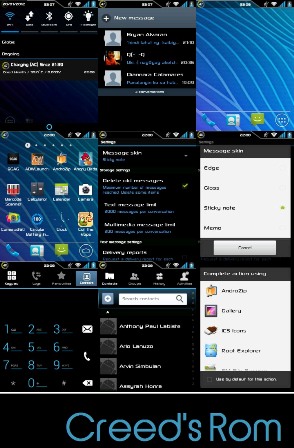
creed custom rom for samsung galaxy y s5360

Before we start customizing your Samsung Galaxy Y S5360, there are things you need to do first and files you needed to download.

1. You’re Samsung Galaxy Y must be rooted. If it’s not, read my article here on How to root Samsung Galaxy Y. Unrooting instructions is also included.

2. You need to download ROM Manager by CWmod. You can download one here.

3. You need to download Clockwork Recovery Mod and install it on your Galaxy Young after you have rooted your phone. You can download the Clockwork Recovery Mod here.

4. And lastly, you need to download the CREED Custom Rom. Download it here.

5. After you have downloaded the Creed Custom ROM for Samsung Galaxy Y, place it in your microSD card in this location. sdcard/clockworkmod/backup
If the folder clockworkmod and backup is not present in your microSD card, you can create them. Just create a folder “clockworkmod” in the main directory of your microsd card and inside it, create a folder “backup”.

WARNING: Before you begin, let me remind you that I will not be liable for any damage or data loss due to this process. I have tried and tested it on my Samsung Galaxy Y. BUT YOU SHOULD TRY THIS AT YOUR OWN RISK!

How to install CREED Custom ROM on Samsung Galaxy Y (Young) GT-S5360:

1. Backup first! This is very important as it will wipe out everything in your Galaxy Y, including installed apps, text messages, contacts, EVERYTHING! It will reset your phone to factory settings.

1.a To backup your phone, make sure you have enough space in your microSD. Go to recovery mode by turning the Galaxy Y off and after it vibrates (meaning its totally off), press and hold Power Button + Volume Up + Home Button until the Galaxy Y Young logo appears.

1.b Now that you’re in recovery mode, select “Apply Update fro SDCard” using the volume down and up button and press the home button as enter. Look for “Skin1980-GT-S5360 CWM.zip” and press Home button/enter. It will go to ClockWorkMod recovery menu.

1.c In the recovery menu choose, “Back up and Restore” and choose “Backup“. Confirm the backup process and wait until it finishes backing-up your phone. Make sure it’s a 100% backup and you encountered no errors during the backup process.

1.d After you have successfully backup your phone, it’s time to install the Creed Custom ROM on your Samsung Galaxy Y.

2. While in ClockWorkMode recovery menu, choose “backup and restore” again, but this time choose “restore“. Then look for the file “2012_01-13.19.07.30“. This is the name of the folder that you have extracted under sdcard/clockworkmod/backup.

Note: By this time, there should be two files already, the 2012_01-13.19.07.30 and the back up file that you have recently created. Notice that the file(folder) name is the current date and time of the ROM when it was created.

3. Confirm the restoration of the file 2012_01-13.19.07.30. After it finishes restoring the ROM, choose “wipe data / reset” from ClockWorkMod recovery menu. And confirm the process. This will reset your phone to factory settings.

Note: I haven’t tested skipping step 3. So I don’t know what will happen if you skip this step.

4. Now reboot your Samsung Galaxy Y and wait until the new “S” logo appears. It might took a few minutes before the S logo appears. It is important that you should wait until the booting has finished.

Note: If the status bar did not appear, or an error occurred, or it’s been an hour already and still nothing happened, that means something went wrong. Try repeating the steps above.

5. After your phone has successfully booted it’s now running on CREED Custom Rom! Congrats!

Some known issues while using Creed Custom Rom:
1. Swype suddenly shows a forced closed error notification. To fix error, use an Android App that can browse the root folder of your Galaxy Y GT-S5360. Look for the Swype.apk under system/app folder and delete it. Or better yet, cut and paste it on your computer for back up purposes in case you need the file later.

UPDATE: Creed Custom ROM v2.1 is now available. You can download it here. However, please be informed that I have not tried Creed Custom ROM v2.1 personally. Good luck!

UPDATE: You might want to see and try these other 6 Awesome Custom Roms for Samsung Galaxy Y.

UPDATE: Creed Custom ROM v3.5 is now available. You can download it here.

Click here to subscribe to The PC Enthusiast and Anime Fanatic and receive latest news on technology, including great deals and discounts!
Related search terms:
  • how to get creed rom v2 oxen zip
  • no confirm phone model galaxy s5360 for rom back up
  • 50 costum room samsung galaxy y

58 comments

  1. CREED ROM IS OK. BUT ONCE MY SAMASUNG GALAXY Y ON CREED’S ROM,.. THE HEADSET DOESN’T WORK…

  2. i have successfully installed creed’s ROM on my SAMSUNG galaxy ys 5360 & IT IS WORKING NICE. I JUST WANTED TO KNOW HOW TO COME BACK TO MY ORIGINAL SAMSUNG GINGERBREAD ROM AS ITS RETAIN BACK MY WARRENTY.

    • Were you able to backup you’re original samsung gingerbread just like I advised to do so? If yes, just do the same process except choose your backup ROM and not Creed Custom ROM. It will revert everything back to the last state when you created a backup for your Galaxy Y.

    • Odin3 v1.85 and S5360DDLA1_S5360ODDLA1_ODD and u will need to downlode them and samsung usb driver and yes it works i use costom rom but i never backed it up and i use this now

    • you can download stock rom from sammobile & odin from XDA website

  3. i hate samsung

  4. hi mate, i am having a big problem, i am not getting anything on your link provided to get clockwork recovery mod. and my rom manager is saying that GT-s5360 does not have an officially supported clockwork mod recovery yet. now tell me how to install clockwork recovery mod manually?

    • After you click the link, just skip the ads. There is a clockwork recovery for S5360. I have tried this to my S5360 following the same instruction in this post.
      Good luck!

  5. hi cant download the clockwork recovery from the link i just click the skip add then nothing happens.. but the 1 file i downloaded it same i just click the skip add and then i download it

  6. Oops! Google Chrome could not connect to http://www.multiupload.co.uk . what will i do?>

  7. it can’t be installed on my phone. :(

  8. creed v2.1 is available plz try to update the post with latest one.

    • I’m still searching for a working creed 2.1 D-Link. If you can provide a link that would be helpful. ^_^ Thanks!

  9. having problm with md5 midsmath yaar please let me out of this problem
    samsung is fukng dude

  10. The clock work recovery mod is zip file the how can we install it on the Samsung galaxy y s5360

  11. i did not create a back up is there some way i can revert back plz help t
    thankyou

  12. it didnt work why ? .. it waws not install ..

  13. Can u tell me what to do with the creed update for v2.1..?
    and where can i get the actual android 4(ice cream sandwich) for my galaxy y and not any custom rom.. please help i want to install ICS On my fone!!

    • Unfortunately there is no ICS update for Galaxy Y. Just themes to make your Galaxy Y look like its running on ICS.

  14. Hey please Help Me I Just InstalleD CWM now when IT was In CW recovery Mood Then I installed ICS Aura Now It Is not working So MAny ErrOrs :( Please Help Me :(

  15. PLease Help ME i had Downloaded CWM now when I was In CW recovery MooD I installed ICS now It Is Giving so many errors PLease Help ME :(

    • Galaxy Y does not have an ICS update yet! Do not use a ROM not intended for a particular model
      If you ment ICS aura, I guess the ROM is buggy. Try other ROMs instead

  16. status bar does not appear
    help plz

  17. How to backup original samsung gingerbread? :(

  18. I have big problem on my samsug galaxy y s5360. When I install creed rom then my set is hank on starting Samsung logo and there are are not processing on turning on.
    Tell me step by step process of install creed rom
    what is the use of CWM

  19. Some things aren’t in english like play store what do i do

  20. Hello .. I have Installed this CUSTOM ROM but i still can’t find the status bar i have already reinstalled Creed over and over .. Any suggestion ?

  21. Hello i can’t Seem to find a way to get the status bar i Kept Reinstalling Followed every Piece in the Guide you have given But I still Can’t See it Any advice ? I would love to install this custom rom this is why i Rooted my phone in the first place

    P.S :- Does it have any thing to do with swype -_- ?

    • Hi! I’m not really sure. Maybe, just try uninstalling it.
      As far as I know these ROM are not 100% perfect and could be buggy.
      I suggest you try another ROM or better yet just use the official ROM.
      There is an update for Galaxy Y from Kies.

  22. it said files are removed…….

  23. Muhammad Farid Mufti

    man, have you creed rom ver 3.0 or 3.5 ?

  24. dude how to upgrade to v3.0??

  25. I already install a creeds rom 3.5 on my galaxy y its amazing than the gingerbred rom. But i cannot use my headset. How can i use my headset?

  26. i tried downloading Clockwork Recovery Mod and CREED Custom Rom but cant download them either…on creed link it shows that that the file has been removed and on clockwork recovery mod i dont know which link to follow…all of them are ads…please help…

  27. My headset its not working on this creed

  28. DOWNLOADING ROM WEBSITE SAYS FILE IS DELETED …….PLEASE HELP

Leave a Reply

Your email address will not be published. Required fields are marked *

*

You may use these HTML tags and attributes: <a href="" title=""> <abbr title=""> <acronym title=""> <b> <blockquote cite=""> <cite> <code> <del datetime=""> <em> <i> <q cite=""> <strike> <strong>

Scroll To Top